Posts

Publishing Task 3: Final Website Migrated, Plugins and Code Snippet Choices

Image
  For my blog post this week I have been asked to talk about the migration of my CA2 website. I migrated my website from my Wordpress Localhost to InfinityFree. To do this I had to create a new domain instead of using the same domain I used for my previous assignment. I had to use a plugin called All-In-One WP Migration and then export all of my plugins on my Wordpress and then import my Wordpress file back onto Wordpress and then add it to my new domain that I created. I chose InfinityFree as I already had experience using it so I thought that would make it easier however it is a difficult process as it takes a long time and sometimes they may charge you for migration. The theme I used for my site is Twenty Twenty-One. I used this theme because I felt like it was the most easy theme to navigate and wasn’t overly complicated and I had used it for my previous assignment and everything worked for me so I was confident that it would work for me this time and it also had an attractive ...

Choosing a UX Based Concept For Your CMS

Image
  https://i.etsystatic.com/25175322/r/il/b2ffa1/3918397368/il_570xN.3918397368_8p99.jpg Introduction This is my publishing task 2 for content management systems. In this blog post I will be talking about the website I will making for my second continuous assessment. I will be talking about UX principles, the kind of website I will be building, why I will be building it and the themes and plugins I will be using. What Will I Build The website I am building is for a fictional vinyl record shop called vinyl world. I am hoping for the website to look like a basic music shop website, for example Golden Discs and Discogs however it will only be vinyl record sales, preferably one of those websites where a customer can sell their own vinyl’s for example the website pictured below. https://miro.medium.com/max/1400/1*d692o2xU3bmxbamMD_4dag.webp I will make sure to include images of the vinyl being sold as well as information such as the pricing of the vinyl, the name of the vinyl, the a...

User Experience (UX) Explained For Best Practice Website Creation

Image
  User experience is the focus of having a deep understanding of its users, what is needed by users, what a user values, user abilities and limitations. User experience also takes a groups business goals and objectives into consideration when they are managing a project. UX is best known for promoting the standards of users interference with and product perceptions and any similar services. UX has multiple factors to make sure that users find value in what is being provided for them. In order for users to have a relevant and valuable user experience it is important that user experience is useful and must be original. The site must also be easy to use. It must be desirable and include images, an identity, a brand as well as other design elements which are used to bring forth emotion and appreciation. A website must be findable. It is important that the website can be navigated and located onsite and offsite. The website must be accessible particularly for people with disabilities an...

Reading 12

Image
  ( http://rosalindgardner.com/blog/wp-content/uploads/launch.jpg ) This week after a long semester of hard work, research and writing we finally finished up on our book chapters. We are now ready to launch our book which is a very good feeling. I have to say this wasn't an easy task to do however I learned lots of new things in the process. The topic I chose was the history of game consoles. I researched different articles every week relating to this topic and learned some very interesting things. I learned that the first ever game console was The Brown Box invented in 1967 by Ralph H. Baer. I also learned that Nintendo was founded by Fusajiro Fukada and that they used to be a card company. I had a lot of difficulty understanding these tasks. At first I was told that my chapter was too long so I had to cut it down which was very difficult as I was worried that I would end up cutting it too short but thankfully the last feedback I got told me that my chapter had improved and that a...

Reading 11

Image
  Image of my chapter This week we finished off our book happy days. We had to make any final edits to our. chapter. I had to add my introduction and I also had to shorten my chapter. I looked through my chapter and took out any information that I felt was unnecessary just to make it shorter because at the beginning I thought it would have to be incredibly long but thankfully it didn't and I preferred that I had too much instead of too little because it's easier to cut things out as opposed to adding things. This turned out to be easier than I thought I was properly panicked at the beginning of the semester when we were told we had to write a book but it got easier as time went on. Next I will have to agree for my chapter to be in the book and I will also have to add the interactive game I made for my book to my chapter. I look forward to seeing the finished result of our book at the end of the semester. 

Reading 10

Image
  Image of myself For this weeks reading task I had to create an author bio and talk about my chapter idea as well as my thoughts on how I'm doing with my chapter.  Author Bio My name is Eoin Harrington. I am a 22 year old creative digital media student in ITB. I am in 2nd year. I am hoping to get into filmmaking when I am finished college. I enjoy drawing, watching films and TV shows and listening to music. My favourite film is Pulp Fiction. I take lots of inspiration from Quentin Tarantino. My favourite TV show is The Sopranos and I like all sorts of music however my favourite genre would be pop punk as well as rap. Some of my favourite artists would include Green Day, Blink-182, Sum 41, Red Hot Chili Peppers, Foo Fighters and Eminem. I'm not much of a gamer but I do enjoy it. My favourite video games would be Grand Theft Auto and God Of War. Chapter Topic My chapter topic is the history of consoles. I chose this topic because I don't a lot about gaming so I decided to pi...

Reading 09

Image
  Image of my check your understanding For this weeks reading tasks we had to once again review two other students work. These were the same two students who's work we reviewed two weeks ago. We also had to make changes based on our reviews. Last week I was told by my lecturer that my chapter was too long and that I had to cut it down. I'm still currently working on that however I have made some progress. The person who reviewed my work said that it was a really interesting topic and that I have done lots of research and he liked how I talked about each individual console however he said I could maybe add a little introduction which I will get around to. Despite these small criticisms I think I'm doing ok enough. Another thing we had to do this week was create an interactive game relating to your chapter topic using a website called H5P. I had never heard of H5P before and at first I found it quite confusing but I actually enjoyed doing it once I got the hang of it. I made ...

Reading 08

Image
  ( https://cdn.vox-cdn.com/thumbor/CRR8pafaE8ZxyBTRjEGqy5wedlk=/0x0:2040x1360/1200x800/filters:focal(857x517:1183x843)/cdn.vox-cdn.com/uploads/chorus_image/image/69525052/DSCF1179.0.0.jpg ) For this weeks reading task I just continued on with my book. The research for this book has actually proven to be easier than I thought now that we've actually started to see each others work. I was a bit worried about how I was doing with this module but after getting positive feedback last week I think I'm doing ok. This week I decided to talk about Microsoft, continuing on from my topic last week where I talked about the history of Xbox. The article I researched was called "Microsoft Corporation" by Brittanica. The article talked about the founding and formation of Microsoft. It also talked about how Microsoft entered the world of gaming and mobile phones with the release of the Xbox consoles as well as the HTC, Motorola, LG and Samsung. It also mentioned that Microsoft origin...

Reading 07

Image
( https://tandartsdegroenehoek.nl/wp-content/uploads/2017/01/Review.jpg ) For this weeks reading task we had to add our chapters from our book to the class Google Doc. We were then split into groups of three and these groups had to review each others work. The two people who I was asked to review talked about games effects on mental health and multiplayer evolution. The person who talked about games effects on mental health talked about both the positive and negative effects on mental health. He discusses how people often feel like video games are bad for your mental health and while he stated that can be true as they can cause you stress they can have a positive impact on your mental health for example when you win the game you are playing can really boost your mood. He mentions that playing Demon Souls can cause you stress however beating the final boss in Ghosts Of Tshunima after playing it over and over again or winning a match on FIFA can help lift your mood. He also mentions that...

Unity Tutorial 07 (Semester 2)

Image
  Image from the tutorial This week I did my final Ruby tutorial for the semester and I have to say it was a pretty good feeling. Up until this week my game has had no audio so this week I had to add some in. This week I learned about audio clips, audio listener and audio source. Audio clips are assets that you can import from an audio file such as MP3 and wav. Audio listener is a component that tells you where the listener is in the scene which is placed on the camera. Audio source is a component that allows you to play an audio clip where the GameObject is. The first thing I had to do was add in some background music. To do this I had to create a new GameObject called BackgroundMusic and add audio source to it. I then had to add in an audio clip called 2D MUSIC LOOP so that the music would play from the beginning to the end. I then had to add in the spatial blend slider and make it go all the way to 2D so that my music could be heard everywhere. I then had to add a one shot sound...

Unity Tutorial 06 (Semester 2)

Image
  Image from the tutorial For this weeks tutorial I had to add a user interface to my game so that I could see Ruby's health on screen. The first thing I had to do was create a UI canvas in my hierarchy. After I did this a new GameObject called EventSystem was added to my scene. This GameObject is a component that dealt with interactions with the UI such as a mouse click. I then had to select this GameObject in my inspector. The GameObject had something called a rect transform component instead of a transform component. The difference between a transform component and a rect transform component is that it has additional UI data and it can be in three different modes: Overlay which makes Unity display your health on screen at all times, camera which aligns the UI with your camera and world space which draws a plane anywhere in your world.  I had to keep it in overlay so I could see Ruby's health all the time. I then had to use the canvas scaler component and set it to constant ...

Reading 06

Image
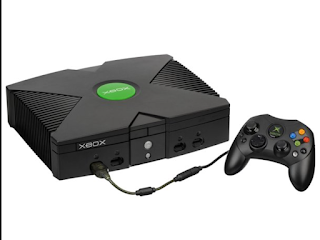
  Image of the original Xbox For this weeks reading task I continued on with my book. My original plan was to add on a piece about Fusajiro Yamauchi, the founder of Nintendo after doing research on Nintendo last week however every article I found on him either didn't give enough information about his personal life or had too much information similar to what I read last week so I would have just been repeating myself. I read an article called "The History Of Xbox" by Gabe Gurwin. I was told I should aim more towards academic articles although I found it hard to find one on the history of Xbox on Google Scholar and believe it or not I just ended up being led to this one but I'm gonna try avoid non-academic articles from now on. As the weeks have been going on I'm starting to get more into these reading tasks and am finding them easier and slightly more enjoyable. I'm beginning to run a bit short of ideas although hopefully by next week I'll think of somethin...

Game Jam

Image
  Image from our game. Introduction This weekend a number of students from different TU Dublin campuses participated in the game jam. The game jam is an event which takes place online over the course of a whole weekend where a number of students from different campuses are put in a group and must create a game together. The brief we were given was to make a game where you can learn a different language. Our language was French. The Team My team consisted of me, Dominika Skrzat another student from my course, Allison O' Donovan and Finn Burke Power, two students from TU Dublin Aungier Street who are studying business and language. These students are studying French and I have never met them before. Myself and Dominikas role was to design the game while Allison and Finns roles were to put together a few French questions for the game. Organisation And Planning A French student and German student were accidentally put on my team at the beginning but because they were two students from ...

Unity Tutorial 05 (Semester 2)

Image
Image from the tutorial Throughout these tutorials I have been using a static camera within a single screen so this week I had learn how to control my camera automatically without needing to use code. This was so my camera would always follow Ruby. To do this first I had to open my packages folder and install my cinemachine package. I then had to add a cinemachine 2D camera to my scene creating a GameObject called CM vcam1. I then learned about the two different camera modes in games. The camera modes are perspective and orthographic. Perspective mode is where the lines going away from the camera converge to a point which makes objects appear smaller as they get further away from the camera. Orthographic mode is when parallel lines stay parallel. The instructions said to leave the camera in orthographic mode because since it is a 2D game things shouldn't get smaller in the distance so that's what I did. I then had to set my camera to 50 units of the world in it's height so ...

Reading 05

Image
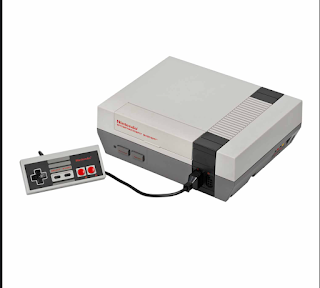
  Image of the Nintendo Entertainment System (NES) For this weeks reading task I continued working on my book. This week I decided to talk about the history of Nintendo. I read an academic article called "The History Of Nintendo: The Company, Consoles And Games" by Laurie Takeda. After weeks of reading wikipedia and newspaper articles my lecturer told me I need to start reading academic ones so I decided to do that for this week. This article talked about how Nintendo first began as a playing cards company in 1889 which I never knew before. I also learned that Nintendo was founded by Fusajiro Yamauchi and is now being ran by his son-in-law Minoru Arakawa. The article also talked about the origin of the company as well as the companies games and consoles. I also learned from this article that the first consoles Nintendo invented were the TV Game 6 and TV Game 15. I had never heard of these consoles before. I now feel like the book writing is going to get better after the feedb...

Unity Tutorial 04 (Semester 2)

Image
  Image from the tutorial For this weeks tutorial I continued on with Ruby's Adventure once again. At this point I had my world created with objects, a character and enemies but this week I had to add animation to my character. The first thing I had to do was go into prefab mode for my robot prefab and add a new component called animator component. Afterwards I had to create an animator controller and set it up in my robot animator.  I then had to enable my controller in my controller setting. After this I had to actually create the animations. To do this I had to open my animation window and create an animation called RobotLeft.anim.  I then had to change my sprites by bringing them into my animation window. I then had to get my robot moving by creating a new animation clip called Right_Run and adding a flip property to my sprite renderer. I then had to build a controller in my animation window. My animator included both layers and parameters on the left side and an anim...

Analysis

Image
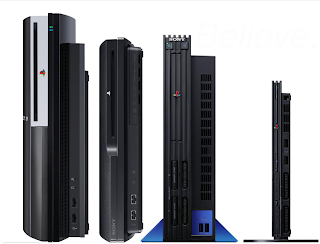
( https://www.gamespot.com/a/uploads/scale_super/1568/15683559/3133099-playstation.jpg ) For this weeks reading task we had to further analyse our topic. Since my topic is "The History Of Gaming Consoles" I decided that this week I was gonna base my research around the Playstation. First thing I did was I looked at an article on the history of Sony as they are the company that invented the Playstation. While I was reading this I discovered that the founder of Sony was Masaru Ibuka so I decided to research an article on him and add that information to my book as well as the history of Sony. I then looked up an article on the evolution of Playstation which included information on the history of each Playstation as well as their notable games. This book writing is starting too get a bit easier however I still am struggling in some areas with things such as review matrix's and referencing although I am learning lots of new information about the history of gaming throughout th...

Unity Tutorial 03 (Semester 2)

Image
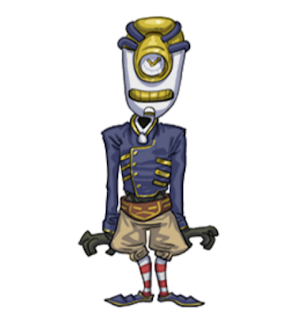
(Image of enemy from the tutorial) For this weeks Unity tutorial I continued on with my Ruby's Adventure tutorials that I have been doing since the beginning of the semester. At this point I had my world set up but this week I had to make it possible for Ruby to collect items such as health packs. First off I had to give Ruby some health. To do this I had to add a health variable to my script. After this I had to add a new variable called a function in order to change my characters health. I had to add the following code: void ChangeHealth(int amount), currentHealth = Mathf.Clamp(currentHealth + amount, 0, maxHealth); Debug.Log(currentHealth + "/" + maxHealth); After I did this I was able to see Ruby's health in the console window. I then had to make it possible for Ruby to collect health. To do this I had to find the CollectibleHealth object in my assets folder and add it to my scene. I then had to adjust the PPU value to the right size. I then had to add a box colli...

Unity Tutorial 02 (Semester 2)

Image
  Image from the tutorial For this weeks Unity tutorial I had to continue on from last weeks one where we set up Ruby's Adventure. This week I had to decorate the world I set up last week. First I had to select the metalcube object from my assets folder and add it to my scene however when I did this Ruby was unable to collide with my GameObject so obviously I had to fix this. To do this I had to go into draw a GameObject using graphic in my project settings. I then had to find transparency sort mode and change my default settings to custom axis. I then had to set my transparency sort axis coordinates to x=0, y=1, and z=0. After I did this Ruby was being drawn in front of the box too early so of course I had to fix this too using the sprite renderer. First I had to select the Ruby GameObject in my hierarchy and find its sprite renderer component in my inspector. Then I had to change my sprite sort point field from center to pivot so that it wouldn't be set in the center anymore....

Reading 03: Researching My Topic

Image
Image of Ralph H. Baer, inventor of The Brown Box holding the object.  ( https://media.npr.org/assets/img/2014/12/08/ralph-baer-02_wide-5c1a8361ab88d5406b9b2e3fd3ea5b895240ff16.jpg ) For this weeks reading task we had to research information relating to our book topic. The topic I have gone with is The History Of Game Consoles. Each week I will be looking at the history of each console and how they have evolved since their release date. This week to get started I just went with a basic description of what a console is. I just used a Wikipedia page to start me off however I understand I can't do this every week.  After I defined what a console is I researched an article on the evolution of consoles. While doing this I learned about consoles that I never knew existed for example the first ever console to be invented The Brown Box. I also discovered a series of consoles called the Magnavox, the first invention being the Magnavox Odyssey. When I finished talking about the evolutio...